![milk-logo.jpeg]](https://support.milkbooks.com/hs-fs/hubfs/milk-logo.jpeg?height=34&name=milk-logo.jpeg)
The thickness of your MILK Photo Book or Photo Album depends on a few factors such as the product type, paper type, and page count. If you are unsure about any of these details, you can find them in your project settings.
Finding your Project Settings
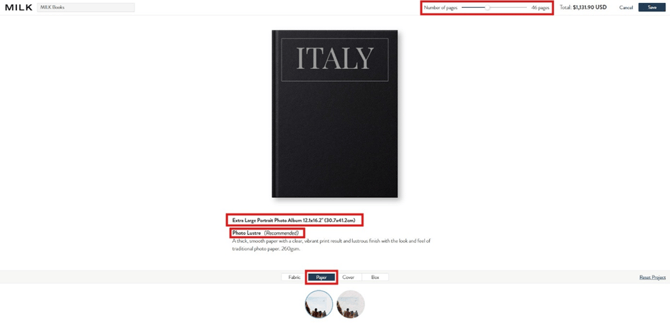
To find your project settings, open your project and click the gear/wheel icon at the top of the screen. This will take you through to the project settings menu.

Confirming your Project Information
In the project settings menu, you will see your page count displayed at the top of the screen. You will also see the cover of your project. Underneath the cover image, you will see the type of product you are creating. To check your paper type, select the option at the bottom of the screen labelled “Paper”.
Spine Widths by Product Type
To find out the spine width of your project, please click the link that matches the product type for your specific project. This will open a PDF with all the measurements for that product type. Please note that these measurements are a guide only, and the final spine thickness may vary slightly depending on the cover type.
| Premium & Leather Photo Albums | Wedding Guest Books |
| Premium Photo Books | MILK Magazines |
| Classic Photo Albums | Softcover Photo Books |
| Classic Photo Books | Moleskine Photo Books |
You can see an example of finding the spine width for a 46-page Premium Photo Album with Photo Lustre paper below:
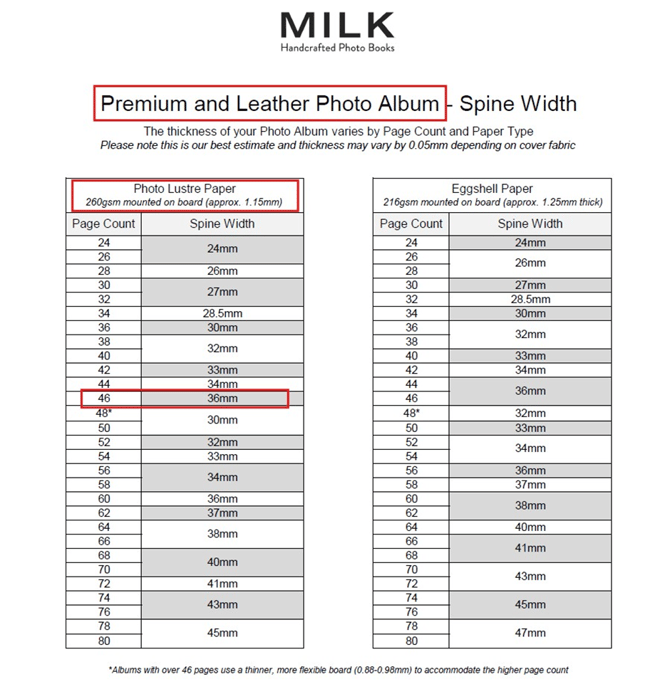
Please note, the orientation or size of your product won’t affect the width of the spine. If you are looking for the length of your spine, this will be the height of the product. You can find product measurements directly on each product page.
If you need further clarification or assistance, feel free to contact our friendly Customer Care team.