![milk-logo.jpeg]](https://support.milkbooks.com/hs-fs/hubfs/milk-logo.jpeg?height=34&name=milk-logo.jpeg)
Each product page features a Product Selector that lets you select your size, format, fabric options, cover options, and page count. This allows you to enter our Design Studio and start creating your desired format straight away. It also shows you the product cost (exclusive of shipping).
Once in the Design Studio, we have a live price calculator that helps you to keep track of the cost. If you decide to add or remove pages, or select one of our optional upgrades, your price will change accordingly. The live price calculator appears in blue at the top right of the Design Studio (if on Mobile, you have to click the down arrow by BUY NOW). You can see a breakdown of the cost when you select the down arrow as well. This is also exclusive of shipping and any discounts or vouchers you may have.
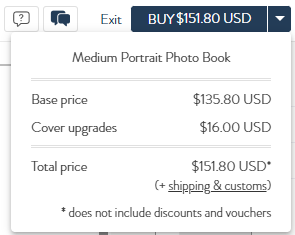
In the basket during the checkout process, you can also see the breakdown of the pricing of your order. More details about your order can be seen under “Review item details”. Here you can see the cost of your Photo Book/Album as well as the cost of any optional upgrades that have been added.

Within a Photo Album, pages must be added in twos. Within a Premium Photo Book, pages must be added in fours and within a Classic Photo Book pages must be added in twos. Leather covers and Presentation Boxes can be added at the prices specified on the Compare Our Range page.